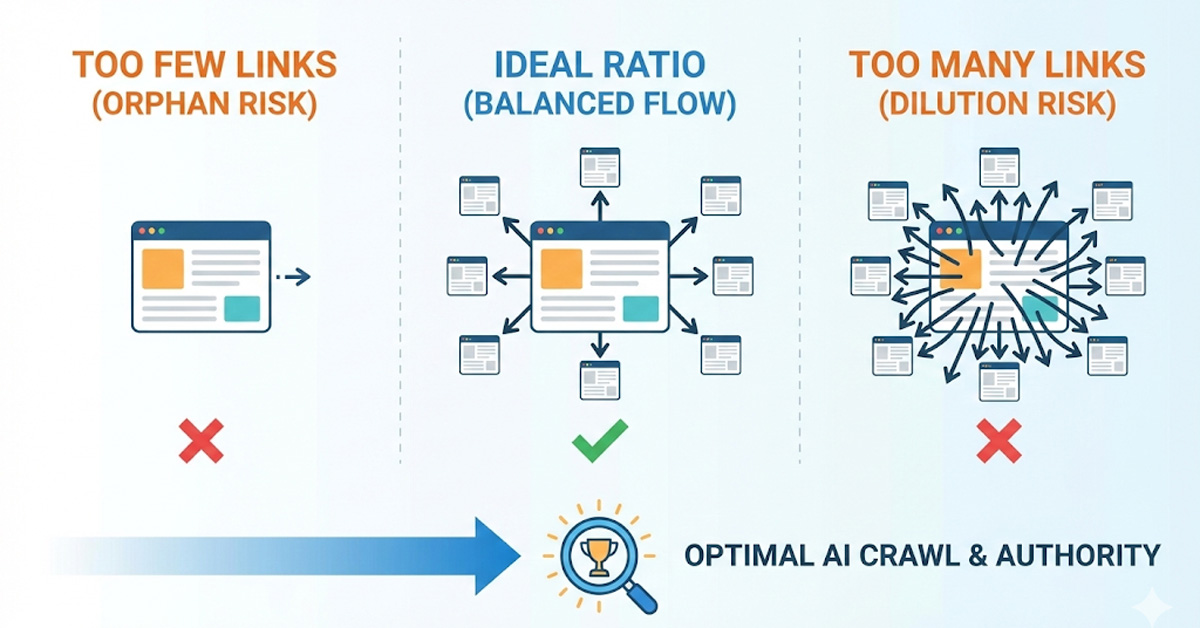
One of the most persistent myths in SEO is the "100 Links Rule."
Years ago, Google suggested keeping links on a page under 100 to avoid looking like spam.
Many SEOs took this as a hard law, afraid that adding link #101 would tank their rankings.
In 2026, that rule is dead.
Modern websites-like Wikipedia or The New York Times-often have 300+ links per page and rank perfectly.
The question is no longer about "How many?" but about "How relevant?"
However, there is a point of diminishing returns.
If you link to everything, you emphasize nothing.
This guide explains the ideal Internal-to-External Link Ratio for the AI era and how to calculate the perfect density for your content.
The "Link Juice" Dilution Math
Imagine your page has 100 points of "Authority" (PageRank) to give away.
- If you link to 1 page, that page gets 100 points.
- If you link to 100 pages, each page gets 1 point.
While Google's math is more complex today, the principle of Dilution remains.
According to a classic explanation by Moz on Link Equity, the more links you have on a page, the less equity each individual link passes.
The Strategy: Don't hoard links, but don't spend them cheaply. Reserve your internal links for your most important Pillar Pages and high-value cluster content.
The External Link Ratio (Citations)
Question: How many times should I link to other websites?
Answer: At least 2-3 times per 1,000 words.
Many site owners are terrified of sending users away.
But AI Answer Engines view External Links as citations.
They prove you have done your research.
A recent consensus in the SEO community, backed by John Mueller from Google, is that linking out does not dilute your rankings.
In fact, it adds context.
The Rule:
- Link out to Data Sources (Stats, Studies).
- Link out to Definitions (Wiki, Investopedia).
- Never link out to direct Competitors for your target keyword.
The Internal Link Ratio (Structure)
Question: How many internal links should I have? Answer: Aim for 5-10 relevant links per 1,000 words.
Internal links serve a different purpose: Navigation. You want to guide the user (and the bot) deeper into your specific Topic Cluster.
The "Wikipedia" Model: Look at any Wikipedia page. The first paragraph is dense with blue links.
This is the gold standard for Semantic SEO. Every time they mention a concept that has its own page, they link to it.
Your Goal:
- First Screen: Try to have 1-2 internal links in your introduction to lower bounce rate.
- Body Content: Link naturally when mentioning related entities.
- End of Post: Always include a "Related Reading" section.
The "Mobile Thumb" Test
In 2026, most traffic is mobile.
If you have too many links packed together (e.g., a list of 50 links in a row), it triggers a "Click Target Sizing" error in Google Search Console.
Users with "fat fingers" can't click the right one.
The Fix: Spread your links out. Avoid massive "link walls" unless it is a dedicated Resource Page.
How to Audit Your Link Density
Are you linking too much? Or too little?
You need to visualize your ratio.
Step 1: Run a Crawl
Use the SEO Shouts Internal Link Checker.
Step 2: Check "Outlinks" Count
Look at the "Outlinks" column for your blog posts.
- < 2 Links: You are creating dead ends (Orphan makers).
- > 100 Links: You might be diluting authority (unless it's a Mega Menu).
Step 3: Check "External" Count
Are you linking out?
If the number is 0, your content might look like an isolated opinion rather than a researched article.
Add 1-2 high-authority citations.
Conclusion: Link for Utility, Not Math
Don't obsess over a specific number like "4.5 links per post."
Ask yourself: Does this link help the user understand the sentence?
If yes, add it. If no, delete it.
The "Ideal Ratio" is simply the one that provides the most value without clutter.
Is your link profile balanced? Check your link counts for free.